Course 01 · In production

Print your first surgical guide. In-house, layer by layer.

A self-paced video course for dentists who place implants and want to bring guide printing in-house for their own patients, using FDA-cleared surgical-guide resin per the manufacturer's instructions.

Taught by Matthew Ross, DMD
Phase 02 · Digital design
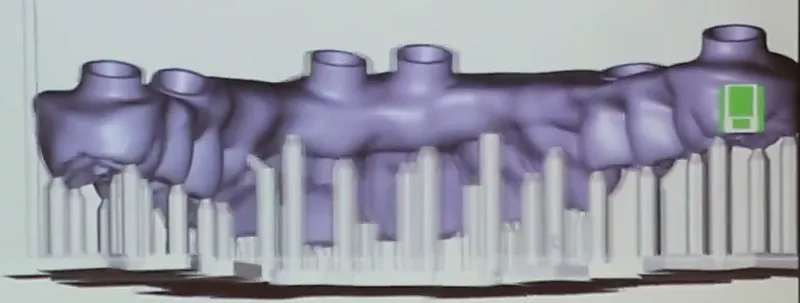
A surgical guide designed in planning software, shown on the projector at a live hands-on course
Guide design, from Matthew's live hands-on course
The workflow

From scan to seated guide, one step at a time.

The same chain every time: acquire, design, print, then check the fit on a model before any clinical use. Each lesson is filmed on typodonts and models.

1Digital acquisition

Scan + CBCT

What your intraoral scan and CBCT need for a guide that fits, and how to check the scan-to-CBCT alignment before you design anything.

.STL.DCMStitch & alignment checkWhere errors stack up
Upper and lower digital models in planning softwareModel editing · live course
2Digital design

Design the guide

Guide design settings and checks before you print: thickness, spacer, offset, windows, guide tubes and sleeves vs sleeveless, then a clean STL export.

Prosthetically drivenSpacer & offsetSleevesClean STL
Guide design in planning software with a guide tube ring around the implant siteGuide tube & offset · live course
3Digital output

Print & post-process

Orientation, supports, cleaning and curing per your resin's IFU. Orientation is a mini puzzle; supports are a Jenga tower. Both decide whether the fit surface survives.
OrientationSupportsWashCure per IFU
A printed part with support structures in slicing softwareSupports in the slicer · live course
4Quality check

Fit check

A repeatable fit-check and inspection routine before every case: printer calibration with QA coupons, a 10-point inspection, sleeve seating and a documented fit check on the printed model.

QA coupons10-point inspectionSleeve seatingModel fit check
Photo comingPrinted guide, seated on a typodontMatthew's own bench photo goes here.
On the bench

Real prints, not renders.

A designed surgical guide in planning softwareDesigned guide · live course
Photo comingGuide on the build plateStraight off the printer, supports on.
Clip comingTurntable: the finished guideA 10-second loop, after wash and cure.
The curriculum · working draft

Eight modules. On models, start to finish.

Built on Matthew's three phases of digital dentistry (acquisition, design, output), followed by quality checks, troubleshooting and cost.

Module 00Start here

Welcome, boundaries & "Why digital?!"

What this course is and isn't, the regulatory map in plain English, and the kit and software you need.

  • Guided surgery: is / is not
  • Your kit
Module 01Acquisition

The workflow end to end

The three phases in ten minutes, then what the planner needs from your intraoral scan and CBCT.

  • .STL · .DCM
  • Error budget
Module 02Design

Planning & guide design

Stitching and alignment, prosthetically driven planning, guide settings, tubes and sleeves, and a clean STL export.

  • Spacer & offset
  • Sleeveless when possible
Module 03Output I

Slicing, orientation & supports

Orient so any inaccuracy lands on a non-critical surface, and keep supports off the fit surface. Resin handling per IFU.

Module 04Output II

Post-processing

Wash, cure, support removal and finishing, then disinfection or sterilization, each per your resin's IFU.

  • Wash
  • Cure
  • Finish
  • Disinfect per IFU
Module 05The core of the course

QA & fit check

Printer calibration with QA coupons, a 10-point inspection, sleeve seating, a documented fit check on the printed model, and clear criteria for when to reprint.

  • QA coupons
  • 10-point inspection
  • Sleeve seating
  • Model fit check
  • When to reprint
Module 06Troubleshooting

When parts don't fit

A decision tree for guides that are too tight, too loose or won't take the drill, plus failures made on purpose.

  • Decision tree
  • Failure gallery
Module 07In-house

Cost, documentation & scaling

A cost-per-guide calculator you fill in with your own numbers, documentation habits, and what staff can take on.

  • Cost per guide
  • QA log
  • Staff roles
DownloadsThe kit

Checklists you can print

A "before you start" checklist, a QA log, a fit-check checklist and a blank cost-per-guide calculator.

  • Before-you-start
  • QA log
  • Fit-check checklist
  • Blank calculator

The curriculum is a working draft and may change before launch. Settings shown in lessons are examples from Matthew's workflow. Verify them against your own kit's and resin's IFU.

Is it for you?

Made for dentists who already place implants.

For

You'll get the most from it if…

  • You're a licensed dentist who places implants, or you're being trained to.
  • You own a resin printer, or you plan to buy one.
  • You want to print guides for your own patients, in-house, with FDA-cleared materials per the IFU.
Not for

It isn't…

  • Implant surgery training. A guide is not a replacement for adequate surgical training, and it isn't a shortcut.
  • A way to make guides for other offices.
  • Clinical, legal or regulatory advice. Clinical judgment stays with you.
Matthew Ross, DMD, teaching at a live hands-on course Teaching a live hands-on day, 2021
Your instructor

Matthew Ross, DMD

Matthew is a dentist who has taught live, hands-on digital dentistry days on scanning, planning, guide design and printing. This course takes that teaching and rebuilds it step by step, filmed on typodonts and models, so you can follow it at your own pace.

His approach is prosthetically driven: plan the teeth first, then the implant, then the guide. And in this course, every guide gets a documented fit check on a model before any clinical use.

“Patients want teeth, not implants.”
Matthew, at a live hands-on course
FAQ

Good questions, straight answers.

Something else? Join the waitlist and reply to the welcome email.

Is this CE?
No. The course is educational only. It isn't approved by any CE provider or board, and no credits are awarded.
When does it open, and what does it cost?
It's in production now. Pricing isn't set yet. Waitlist members hear first when it opens and get the founding price.
Do I need a 3D printer already?
No, you can join the waitlist either way. The course covers the hardware, software and consumables in the workflow, and it's built for dentists who own a resin printer or plan to buy one.
Which software, printer and resin does it use?
Demos use the tools from Matthew's own workflow. Any settings shown are examples from that workflow, not a standard. Always verify them against your own kit's and resin's instructions for use (IFU).
Are real patients shown?
Course demos use typodonts and models only, and no patient information is shown. Please don't send any patient information when you sign up or reply.
Can I make guides for other offices?
This course is about printing guides for your own patients at the point of care, using FDA-cleared surgical-guide resin per the manufacturer's IFU. It doesn't cover making guides for other practices.
Is this clinical advice?
No. It's education, not legal, regulatory or clinical advice. Clinical judgment stays with the treating clinician, and no results are guaranteed.
Is it live or self-paced?
Self-paced and pre-recorded, with downloadable checklists and a blank cost-per-guide calculator.
Join the waitlist

Start with the first layer.

In production. Join the waitlist to hear first when it opens and get the founding price.